 星河拾贝录
星河拾贝录Spring Boot With BDD
什么是 BDD
BDD(Behavior Driven Development),行为驱动开发,是一种敏捷软件开发的技术,它鼓励软件项目中的开发者、QA 和非技术人员或商业参与者之间的协作。
BDD 的重点是通过与利益相关者的讨论取得对预期的软件行为的清醒认识。它通过用自然语言书写非程序员可读的测试用例扩展了测试驱动开发方法。行为驱动开发人员使用混合了领域中统一的语言的母语语言来描述他们的代码的目的。这让开发者得以把精力集中在代码应该怎么写,而不是技术细节上,而且也最大程度的减少了将代码编写者的技术语言与商业客户、用户、利益相关者、项目管理者等的领域语言之间来回翻译的代价。
具体怎么操作
结合我们项目开发使用的 spring boot 2.x,下面我们来具体说明如何在实际项目中使用 BDD。
依赖的包
<cucumber.version>4.2.5</cucumber.version>

...

<dependency>
    <groupId>io.cucumber</groupId>
    <artifactId>cucumber-junit</artifactId>
    <version>${cucumber.version}</version>
    <scope>test</scope>
</dependency>

<dependency>
    <groupId>io.cucumber</groupId>
    <artifactId>cucumber-java</artifactId>
    <version>${cucumber.version}</version>
    <scope>test</scope>
</dependency>

<dependency>
    <groupId>io.cucumber</groupId>
    <artifactId>cucumber-spring</artifactId>
    <version>${cucumber.version}</version>
    <scope>test</scope>
</dependency>
定义启动文件
BDD 其实也是依赖 junit,然后调用Cucumber的 Runner 来运行相应的测试。
package com.weibo.ad.bp.st.ryujo.web.test;

import cucumber.api.CucumberOptions;
import cucumber.api.junit.Cucumber;
import org.junit.runner.RunWith;

@RunWith(Cucumber.class)
@CucumberOptions(features = "classpath:features",
        tags = {"not @ignored", "@base"},
        plugin = {"pretty", "html:target/cucumber", "junit:target/junit-report.xml"},
        glue = {"classpath:com.weibo.ad.bp.st.ryujo.web.test.step"})
public class RunCucumberTest {
}@CucumberOptions中的 features,用于指定我们项目中要运行的 feature 的目录@CucumberOptions中的 format,用于指定我们项目中要运行时生成的报告,并指定之后可以在 target 目录中找到对应的测试报告@CucumberOptions中的 glue,用于指定项目运行时查找实现 step 定义文件的目录@CucumberOptions中的 tags,用来决定想要 Cucumber 执行哪个特定标签(以及场景),标签以“@”开头,如果是排除某个特定标签,用"not @ignored"
定义 feature
在项目模块的test/resources/features目录下新建一个get_mid_info.feature 文件
@base
Feature: Get Mid Info.
  This is some operations about mid.

  Scenario Outline: Get Mid info by mid.
    Given mid is "<mid>"
    When I ask whether the mid info can be get correctly.
    Then I shoud be told "<answer>"

    Examples:
      | mid        | answer |
      | 2608812381 | Yes    |
| 123 | No |当然也可以使用Scenario来写
@base
Feature: Get Mid Info
    Scenario: I can get mid info correctly
      Given mid is 2608812381
      When I ask whether the mid info can be get correctly
      Then I shoud be told "Yes"

    Scenario: I can't get mid info correctly
      Given mid is 123
      When I ask whether the mid info can be get correctly
      Then I shoud be told "No"
相关术语
| 单词 | 中文含义 |
|---|---|
| Feature | 功能 |
| Background | 背景 |
| Scenario | 场景,剧本 |
| Scenario Outline | 场景大纲,剧本大纲 |
| Examples | 例子 |
| Given | *, 假如,假设,假定 |
| When | *, 当 |
| Then | *, 那么 |
| And | *, 并且,而且,同时 |
| But | *, 但是 |
以上get_mid_info.feature文件中我们可以很清楚的了解到,我们这里定义了一个获取 mid info 的功能,此功能包含了根据 mid 获取 mid info 的场景大纲,大纲包含了示例的列表,假定 mid 依次为 examples 中列举的 mid 的值时候,当我们判断是否能正确获取到 mid info,那么答案依次为 examples 中对应的 answer。
实现相应的 step
我们在com.weibo.ad.bp.st.ryujo.web.test.step包下新建一个TestFeedMidServiceStep类:
@Slf4j
public class TestFeedMidServiceStep {

    private Long mid;

    private String actualAnswer;

    @Autowired
    private FeedMidService feedMidService;

    @Given("^mid is \"([^\"]*)\"$")
    public void mid_is(String arg1) throws Exception {
        this.mid = Long.valueOf(arg1);
    }

    @When("^I ask whether the mid info can be get correctly\\.$")
    public void i_ask_whether_the_mid_info_can_be_get_correctly() throws Exception {
        List<String> type = new ArrayList<>();
        type.add("1");
        FeedMidResp.ObjectEntity objectEntity =
                feedMidService.getAuthorizedMidInfo(mid, null, "hosho", null, false, type, null, null, null);
        log.info("{}", objectEntity);
        if (null != objectEntity && !objectEntity.getItems().isEmpty()) {
            this.actualAnswer = "Yes";
        } else {
            this.actualAnswer = "No";
        }
    }

    @Then("^I shoud be told \"([^\"]*)\"$")
    public void i_shoud_be_told(String arg1) throws Exception {
        assertEquals(arg1, this.actualAnswer);
    }
}
配置 spring boot 容器
至此我们已经写好了一个基本的 feature,但是由于我们的测试依赖了 spring 管理的 bean,所以运行测试时必须启动 spring 容器。这里提供两种基本的方法。
方法一:
在每个 step 类上添加 spring 测试相关的注解:
@Slf4j
@ContextConfiguration
@SpringBootTest(webEnvironment = SpringBootTest.WebEnvironment.RANDOM_PORT)
@ActiveProfiles("test")
public class TestFeedMidServiceStep {
   ......
}或者自定义一个注解类CucumberStepsDefinition
package com.weibo.ad.bp.st.ryujo.web.test.step;

import org.springframework.boot.test.context.SpringBootTest;
import org.springframework.test.context.ActiveProfiles;
import org.springframework.test.context.ContextConfiguration;

import java.lang.annotation.ElementType;
import java.lang.annotation.Retention;
import java.lang.annotation.RetentionPolicy;
import java.lang.annotation.Target;

@Target(ElementType.TYPE)
@Retention(RetentionPolicy.RUNTIME)
@ContextConfiguration
@SpringBootTest(webEnvironment = SpringBootTest.WebEnvironment.RANDOM_PORT)
@ActiveProfiles("test")
public @interface CucumberStepsDefinition {
}
然后在每个 step 类上加上该注解:
@Slf4j
@CucumberStepsDefinition
public class TestFeedMidServiceStep {
   ......
}
这种方法的优点是简单,基本上很多网上的示例代码都是这样写的,但是如果有多个 step 类的时候,在运行测试的时候,会多次初始化 spring 容器。而且还会抛出 WARN 信息。
于是就有了第二种方法。
方法二:
参考 https://github.com/cucumber/cucumber-jvm/issues/1420#issuecomment-405258386
在glue指定的包路径下新建一个CucumberContextConfiguration类
package com.weibo.ad.bp.st.ryujo.web.test.step;

import cucumber.api.java.Before;
import org.springframework.boot.test.autoconfigure.web.servlet.AutoConfigureMockMvc;
import org.springframework.boot.test.context.SpringBootTest;
import org.springframework.test.context.ActiveProfiles;

@ActiveProfiles("test")
@SpringBootTest
@AutoConfigureMockMvc
public class CucumberContextConfiguration {

    @Before
    public void setup_cucumber_spring_context(){
        // Dummy method so cucumber will recognize this class as glue
        // and use its context configuration.
    }
}注意这里用的@Before注解是cucumber.api.java.Before,如果用错了,是不起作用的。
然后我们就可以正常的实现 step 类了,而且可以直接使用@Autowired来注入 spring 管理的 bean.
运行测试
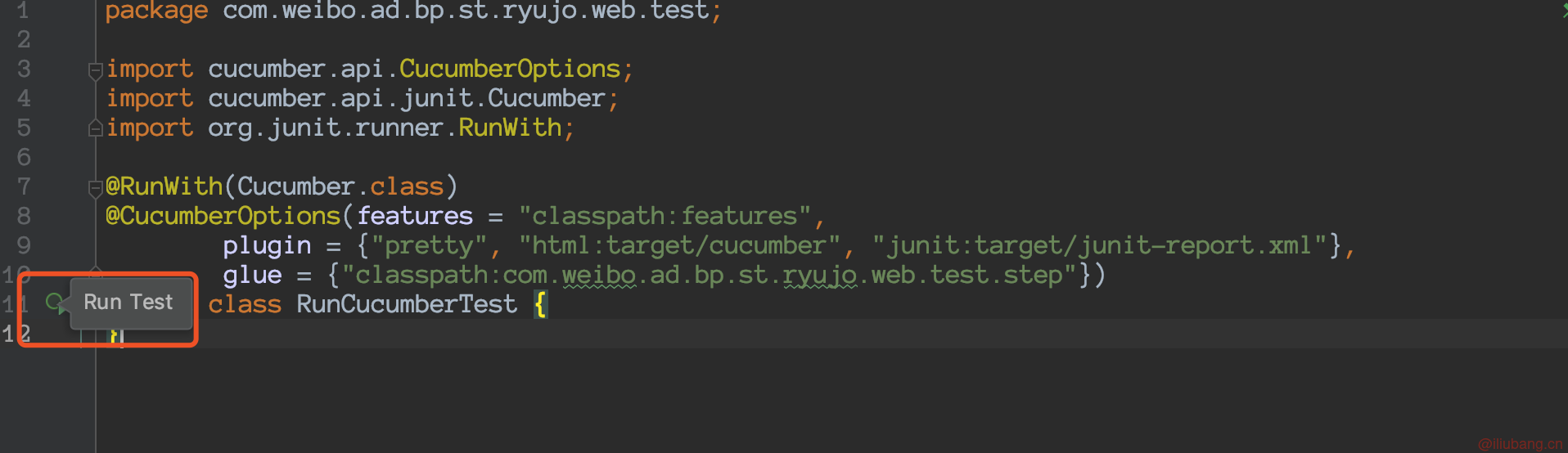
mvn clean test或者使用 IDE 的话,直接点击RunCucumberTest类上的按钮即可。
补充说明
IDEA 建议安装 Cucumber for java 插件。https://plugins.jetbrains.com/plugin/7212-cucumber-for-java
中文支持
Cucumber 本身支持超过 30 种语言(此处语言是 Spoken Language 而非 Programming Language)。查看其所有支持的语言和对应的关键字可以访问https://github.com/cucumber/cucumber/blob/master/gherkin/gherkin-languages.json
下面我们来使用中文来描述一个 feature。
# language: zh-CN
@base
功能: 测试计算器

  场景大纲: 两个整数的四则运算
    假如 我们有两个整数<a>和<b>
    当 我们将其求和运算
    那么 我们能得到数值 <c>
    例子:

      | a | b | c |
      | 1 | 2 | 3 |
| 2 | 5 | 7 |首先第一行我们使用# language: zh-CN来说明我们使用的是中文,这样安装了 cucumber 插件的 IDE 也会有相应的关键字提示和语法高亮。
然后编写 step
package cn.iliubang.exercises.bdd.test.glue;

import cucumber.api.java.zh_cn.假如;
import cucumber.api.java.zh_cn.当;
import cucumber.api.java.zh_cn.那么;
import org.junit.Assert;

public class Test1 {

    private Integer a;
    private Integer b;
    private Integer c;

    @假如("我们有两个整数{int}和{int}")
    public void 我们有两个整数_和(Integer int1, Integer int2) {
        a = int1;
        b = int2;
    }

    @当("我们将其求和运算")
    public void 我们将其求和运算() {
        c = a + b;
    }

    @那么("我们能得到数值 {int}")
    public void 我们能得到数值(Integer int1) {
        Assert.assertEquals(int1, c);
    }
}
这里很神奇的是,连注解都是中文的。最后是编写启动文件,这里不再赘述。运行的结果如下:
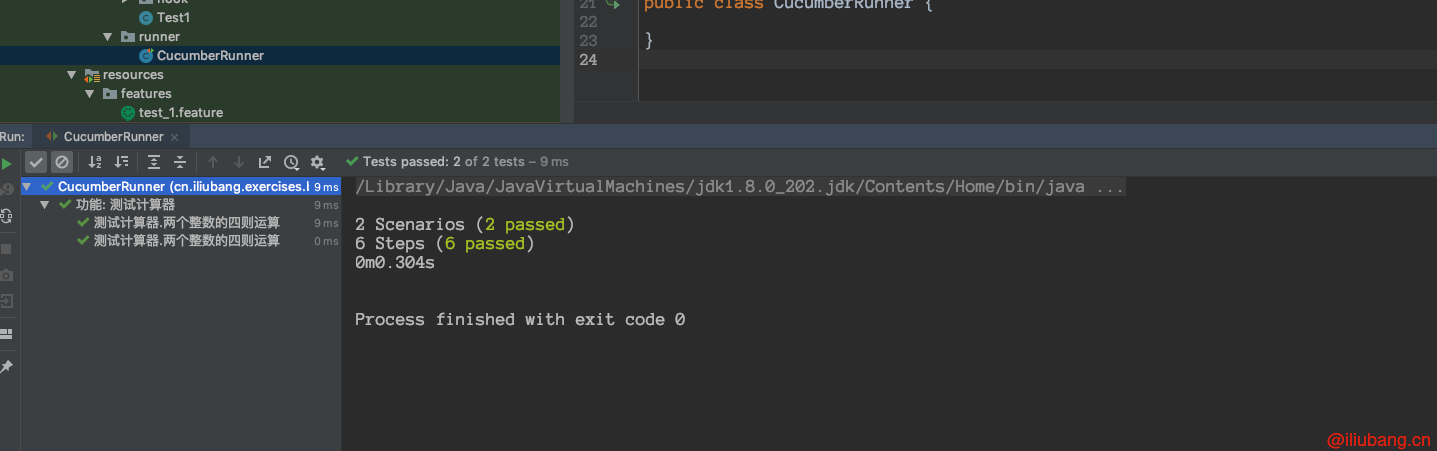
指定 Cucumber 运行结果报告
Cucumber 本身支持多种报告格式以适用于不同环境下调用的报告输出:
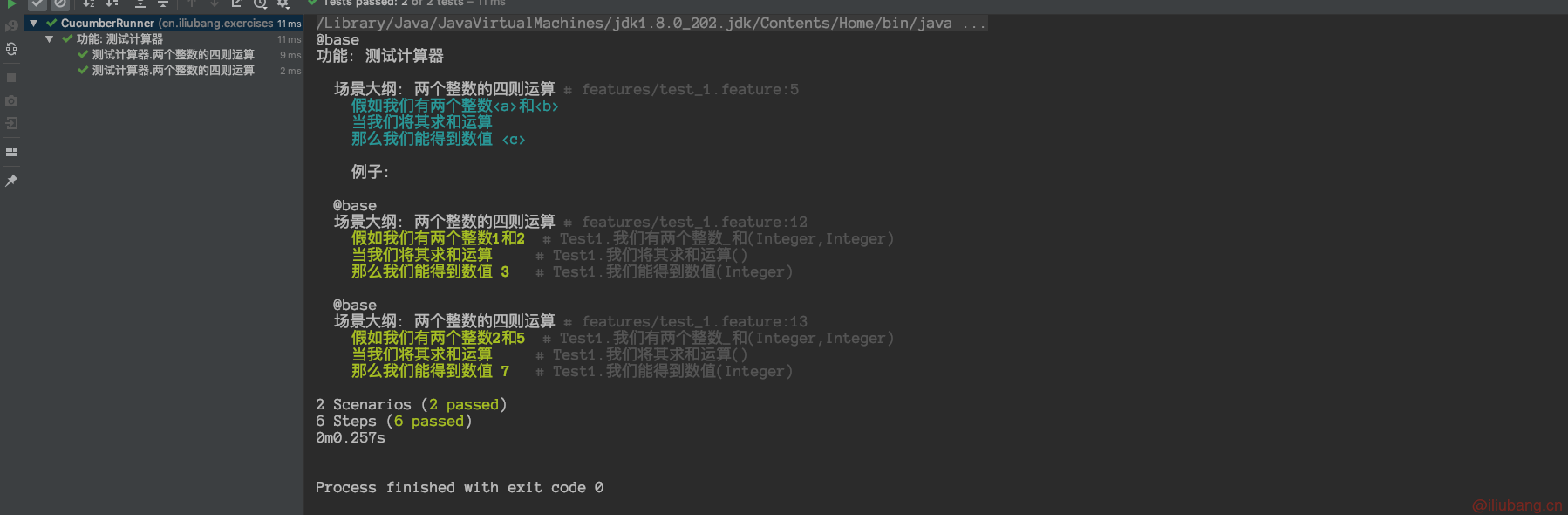
- pretty :用于在命令行环境下执行 Cucumber 测试用例所产生的报告,如果您的 console 支持,pretty 形式的报告还可以按照颜色显示不同的运行结果;如下图所示的例子分别显示了用例执行通过和用例没有 Steps definitions 的输出报告:
- json :多用于在持续集成环境下的跨机器生成报告时使用,比如在用例执行的机器 A 上运行 Cucumber 测试用例,而在调度或报告机器 B 上生成用例执行报告,此时只需要把生成的 JSON 报告传输到机器 B 上即可。
[
  {
    "line": 3,
    "elements": [
      {
        "line": 12,
        "name": "两个整数的四则运算",
        "description": "",
        "id": "测试计算器;两个整数的四则运算;;2",
        "type": "scenario",
        "keyword": "场景大纲",
        "steps": [
          {
            "result": {
              "duration": 3204397,
              "status": "passed"
            },
            "line": 6,
            "name": "我们有两个整数1和2",
            "match": {
              "arguments": [
                {
                  "val": "1",
                  "offset": 7
                },
                {
                  "val": "2",
                  "offset": 9
                }
              ],
              "location": "Test1.我们有两个整数_和(Integer,Integer)"
            },
            "keyword": "假如"
          },
          {
            "result": {
              "duration": 110745,
              "status": "passed"
            },
            "line": 7,
            "name": "我们将其求和运算",
            "match": {
              "location": "Test1.我们将其求和运算()"
            },
            "keyword": "当"
          },
          {
            "result": {
              "duration": 1611672,
              "status": "passed"
            },
            "line": 8,
            "name": "我们能得到数值 3",
            "match": {
              "arguments": [
                {
                  "val": "3",
                  "offset": 8
                }
              ],
              "location": "Test1.我们能得到数值(Integer)"
            },
            "keyword": "那么"
          }
        ],
        "tags": [
          {
            "name": "@base"
          }
        ]
      },
      {
        "line": 13,
        "name": "两个整数的四则运算",
        "description": "",
        "id": "测试计算器;两个整数的四则运算;;3",
        "type": "scenario",
        "keyword": "场景大纲",
        "steps": [
          {
            "result": {
              "duration": 779875,
              "status": "passed"
            },
            "line": 6,
            "name": "我们有两个整数2和5",
            "match": {
              "arguments": [
                {
                  "val": "2",
                  "offset": 7
                },
                {
                  "val": "5",
                  "offset": 9
                }
              ],
              "location": "Test1.我们有两个整数_和(Integer,Integer)"
            },
            "keyword": "假如"
          },
          {
            "result": {
              "duration": 472993,
              "status": "passed"
            },
            "line": 7,
            "name": "我们将其求和运算",
            "match": {
              "location": "Test1.我们将其求和运算()"
            },
            "keyword": "当"
          },
          {
            "result": {
              "duration": 199326,
              "status": "passed"
            },
            "line": 8,
            "name": "我们能得到数值 7",
            "match": {
              "arguments": [
                {
                  "val": "7",
                  "offset": 8
                }
              ],
              "location": "Test1.我们能得到数值(Integer)"
            },
            "keyword": "那么"
          }
        ],
        "tags": [
          {
            "name": "@base"
          }
        ]
      }
    ],
    "name": "测试计算器",
    "description": "",
    "id": "测试计算器",
    "keyword": "功能",
    "uri": "classpath:features/test_1.feature",
    "tags": [
      {
        "name": "@base",
        "type": "Tag",
        "location": {
          "line": 2,
          "column": 1
        }
      }
    ]
  }
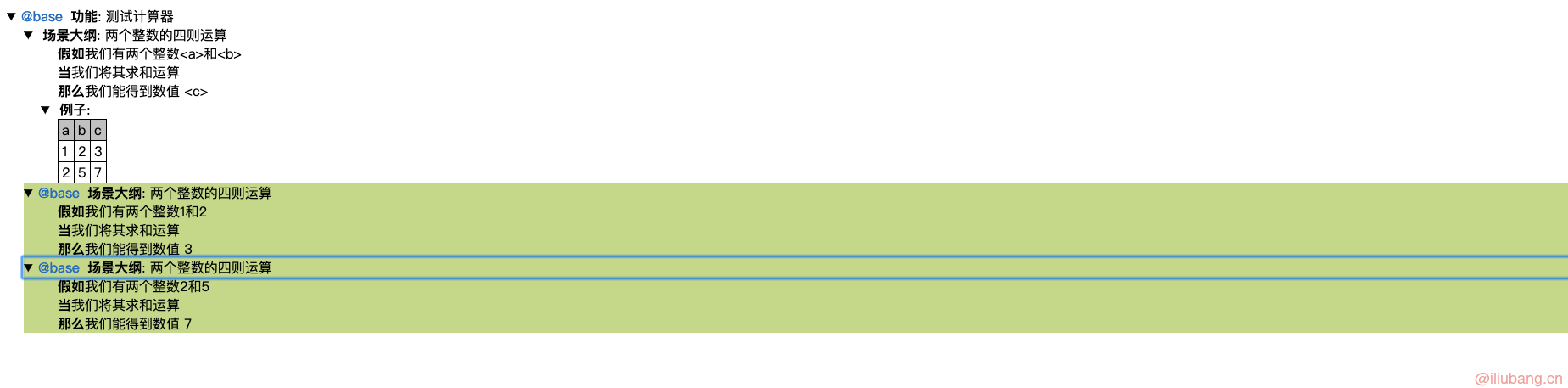
]- html :用于生成简单的 HTML 格式的报告以便查看 Cucumber 测试用例运行的结果
- junit :用于生成 JUnit 格式的报告:
<?xml version="1.0" encoding="UTF-8" standalone="no"?>
<testsuite failures="0" name="cucumber.runtime.formatter.JUnitFormatter" skipped="0" tests="2" time="0.028641">
<testcase classname="测试计算器" name="两个整数的四则运算" time="0.022812">
<system-out><![CDATA[假如我们有两个整数1和2................................................................passed
当我们将其求和运算...................................................................passed
那么我们能得到数值 3.................................................................passed
]]></system-out>
</testcase>
<testcase classname="测试计算器" name="两个整数的四则运算_2" time="0.005829">
<system-out><![CDATA[假如我们有两个整数2和5................................................................passed
当我们将其求和运算...................................................................passed
那么我们能得到数值 7.................................................................passed
]]></system-out>
</testcase>
</testsuite>
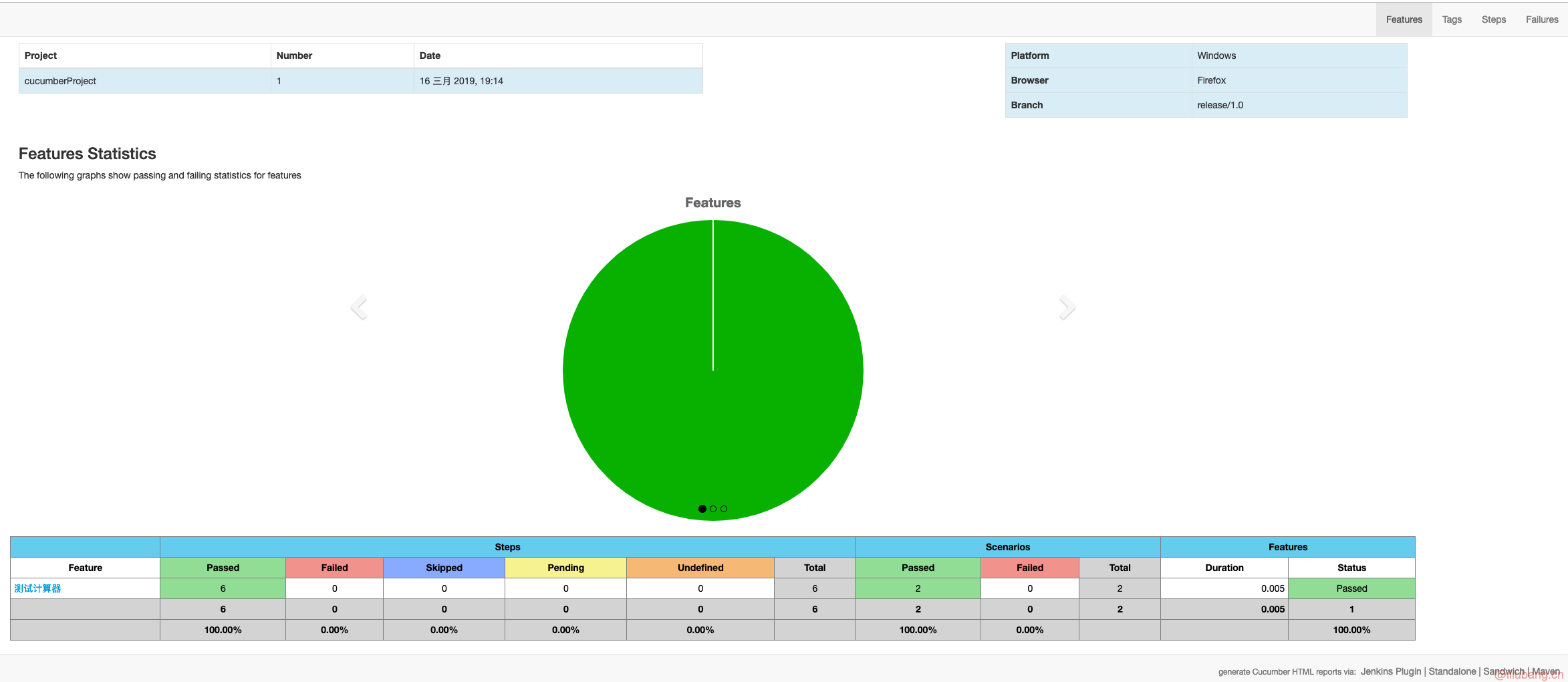
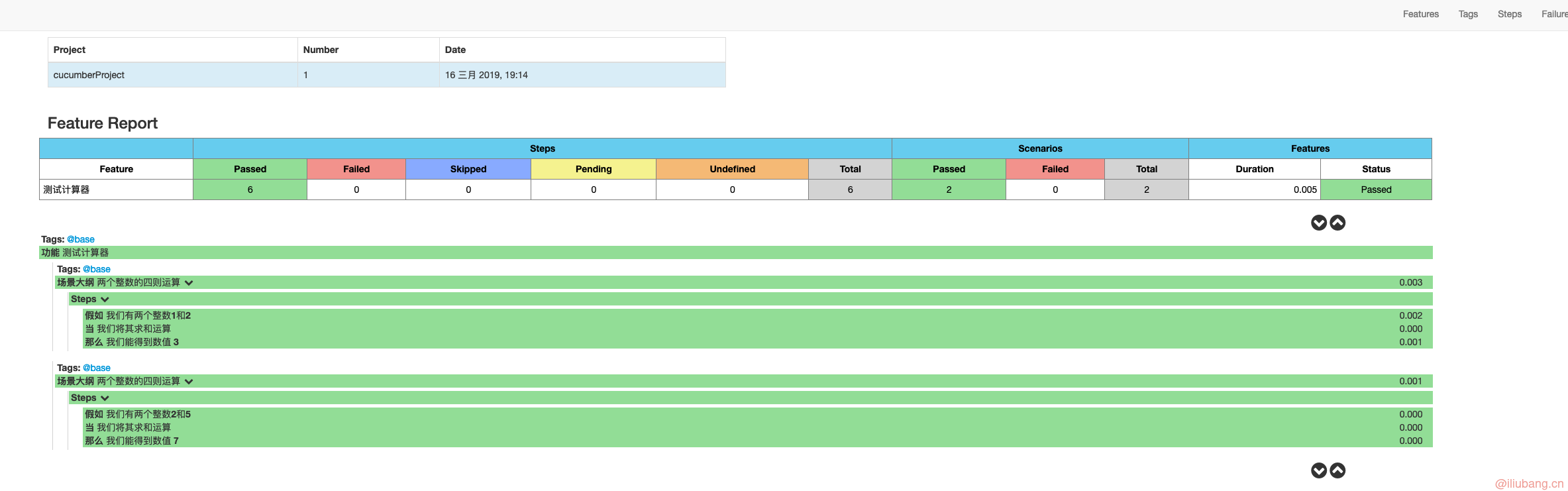
此外,Github 上有很多开源的插件或者 Cucumber 扩展可以帮助从 JSON 格式的报告生成 HTML 格式的报告。这里推荐大家使用 Cucumber-reporting。Cucumber-reporting 不仅能够完成从 JSON 格式报告生成 HTML 格式报告,而且可以按照 tag 和 feature 以及 step 查看,不得不提的是生成的 HTML 格式报告的样式非常好看,下面就是以本文中所使用的 feature 文件为例,以 Cucumber-reporting 来生成的 HTML 报告: